Fake challan message and mParivahan fake app: how I checked mine before I paid
I woke up this morning to a fake challan message, and for a second it had me. Red signal, speed camera, my vehicle number right there in the text. I started doing the sums in my head: was it me, my wife, my son?
It was none of us. The message was an e-challan scam, and a well built one. Here is what it said, how I checked it, and what I would want every family member to know about the mParivahan fake app it pushed me to install.
Save this for later
- A traffic fine is never paid through a link in an SMS or WhatsApp message.
- A message that asks you to download an app is a scam. The real mParivahan app comes only from the Play Store or App Store.
- Your vehicle number being correct proves nothing.
- Do your challan check on echallan.parivahan.gov.in or in the app you installed yourself.
- If you clicked or installed anything, call 1930 and your bank right away.
हिंदी में सार (फर्जी चालान मैसेज / ई चालान फ्रॉड): चालान के जिस मैसेज में ऐप डाउनलोड करने या लिंक से पेमेंट करने को कहा जाए, वह फर्जी है। असली mParivahan ऐप सिर्फ Play Store या App Store से आता है। चालान सिर्फ echallan.parivahan.gov.in पर जांचें। लिंक दबा दिया हो या ऐप इंस्टॉल कर लिया हो, तो तुरंत 1930 पर कॉल करें और अपने बैंक को बताएं।
Table of Contents
Last updated: 20 October 2026.
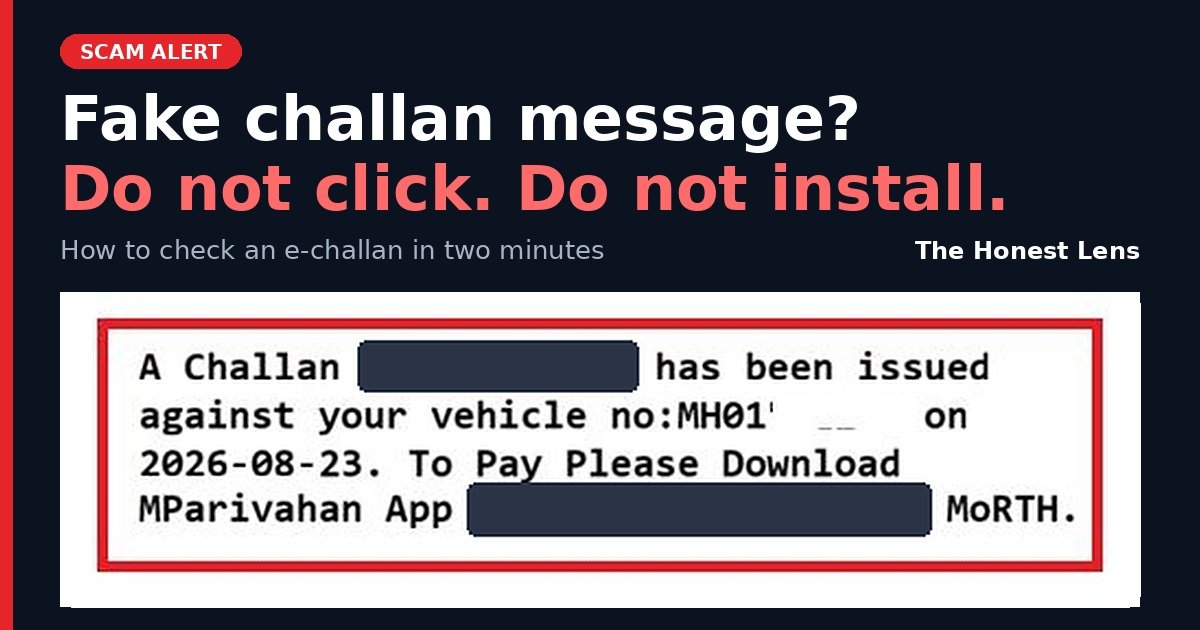
The fake challan message I received
Here is the text, with the link and numbers masked:
A Challan MH01xxxxxxxxxx has been issued against your vehicle no:MH01xxxxxxxx on 2026-08-23. To Pay Please Download MParivahan App https://rb.gy/xxxxxx MoRTH.
The formatting was clean. It named the ministry. The vehicle number was mine, and it was correct. The date was almost two months back, on a day I could not place.
Why this fake traffic challan message felt real
Every guide I have read says a fake challan message will not have your vehicle number. This one did. So I would stop using that as a test.
I still do not know where they got it. Vehicle numbers pass through parking apps, service centres, insurers and resale listings, and sometimes they leak. Treat your number as public. A message that knows it is not proof of anything.
What I did, and what I did not do
Checking before I pay is an old habit. It is not wisdom, it is just habit.
- I did not tap the link.
- I opened the Mumbai Traffic app. No challan on my vehicle.
- I opened the official mParivahan portal. No challan there either.
Two official sources, both empty. That was enough.
What gave the fake e-challan SMS away
Once I was calm, the message had plenty of tells.
- The link is a shortened rb.gy address. A government payment page would sit on a gov.in address, so the answer to “is the e-challan link safe” here was a clear no.
- It asks you to download an app from that link. The mParivahan app is available only on the Google Play Store and the Apple App Store, and Kerala’s transport officials have said it never comes as an APK file.
- It says nothing about the offence. No place, no time, no violation. Police in Rohtak have said genuine messages carry details such as engine and chassis numbers.
- The challan number is 12 characters long. Kerala’s transport department said genuine challan numbers have 19 digits and the fake ones in their warning had 14. The scammers clearly change the format, so do not lean on this one.
No single tell is a guarantee. Together they were obvious, but only after I stopped panicking, and that is the whole problem.
The mParivahan fake app: what it does to your phone
The “mParivahan app” in that link does not check challans. Government advisories describe this e-challan APK scam as a malicious Android app installed from outside the store, which asks for access to your SMS and other data.
With SMS access, the scammers can read your OTPs. With your OTPs they can move money through mobile banking or UPI. PIB Fact Check has warned about exactly this: fake challan links and unknown apps that expose OTPs and lead to unauthorised bank transactions.
E-challan scam: real challan or fake, at a glance
| What to look at | Fake challan message | Real challan |
|---|---|---|
| Link | Shortened or look-alike address such as rb.gy or echallan-govt.in | Official gov.in address, such as echallan.parivahan.gov.in |
| App | Asks you to download an app or APK from the link | mParivahan only from Play Store or App Store |
| Sender | Often a random mobile number | Official sender ID or state traffic channel |
| Details | Vehicle number and date, little else | Offence, place, time and other vehicle details |
| Tone | Urgency, penalty or legal threats | Neutral and factual |
| Official portal | “No challan found” when you search your vehicle | Challan visible when you search |
How to check challan by vehicle number, safely
- Ignore the link in the message.
- Type echallan.parivahan.gov.in into your browser yourself, or open the mParivahan app you installed from the store.
- Choose “Check Challan Status” and enter your vehicle number.
- If it says no challan found, the message was fake.
Do not search “challan check” on Google and tap the first result. Scam sites buy ads to sit at the top. Type the address or use the app.
E-challan fraud: what to do if you already clicked or installed the app
Do these in order.
Right now
- Switch off mobile data and Wi-Fi, or turn on airplane mode.
- Uninstall the app.
Within the hour
- Call your bank and block cards, net banking and UPI.
- Call the National Cyber Crime Helpline on 1930, or file at cybercrime.gov.in. Officials ask for reports within the first hour.
After that
- Change your banking and email passwords from a different, clean phone.
- Keep screenshots of the SMS and the link. Report the message on Sanchar Saathi (Chakshu) at sancharsaathi.gov.in.
If you tapped the link but installed nothing, still turn off data, close the tab and watch your bank alerts for the next few days.
If your phone is lost or stolen as well, my lost phone checklist for India covers SIM, UPI, banks and IMEI blocking.
The people in your family who would click first
I recheck things by habit. Most people do not, and that is not their fault. Nobody ever sat them down and showed them what a scam looks like.
Think about your parents and in-laws. A fine notice shows up with their own vehicle number and an official name, while they are making tea. The panic comes first and the checking, if it happens at all, comes later.
Tell them three things tonight:
- A fine is never paid through a link in a message.
- Apps come only from the Play Store or App Store, never from a link.
- Before doing anything, call me.
A warning fades in a day, and practice stays. That is why I built the BE CYBER SMART portal: a 3-minute daily quiz on real scams like this one, in English, Hindi, Marathi and Tamil, so checking is already a habit before the panic arrives.
I was lucky this time, and it was habit that saved me. So who in your family checks first, and who would just click?
Frequently asked questions
How do I know if a challan message is fake?
Look at the link and the ask. A fake challan message pushes you to open a link or download an app to pay. Do your challan check on echallan.parivahan.gov.in or in the mParivahan app instead. If nothing shows there, the message is fake.
Is the mParivahan app an APK file?
No. The official mParivahan app comes only from the Google Play Store and the Apple App Store. A message that hands you an APK to “download the mParivahan app” is the mParivahan fake app, and it is a scam.
Is an e-challan link in an SMS safe?
No. Government advisories say traffic fines are not collected through random SMS links or WhatsApp forwards. Pay only on the official e-challan portal or your state’s official portal.
What if the fake e-challan SMS has my correct vehicle number?
It is still fake. Scammers can get vehicle numbers from many places. Verify the challan on the official portal, not from the details in the SMS.
Is rb.gy a government link?
No. rb.gy is a link shortener, and a government payment page would use a gov.in address. Treat any shortened link in a challan message as a red flag.
What should I do if I clicked the fake challan link?
Turn off the internet, uninstall any app it installed, call your bank to block cards and UPI, then report on 1930 or at cybercrime.gov.in.
Where do I report an e-challan scam message?
Call 1930, file at cybercrime.gov.in, and report the message on Sanchar Saathi (sancharsaathi.gov.in) using the Chakshu option.
फर्जी चालान मैसेज आए तो क्या करें?
लिंक न दबाएं और कोई ऐप इंस्टॉल न करें। echallan.parivahan.gov.in पर अपना वाहन नंबर डालकर चालान जांचें। कुछ न मिले तो मैसेज फर्जी है। इसकी शिकायत 1930 या cybercrime.gov.in पर करें।