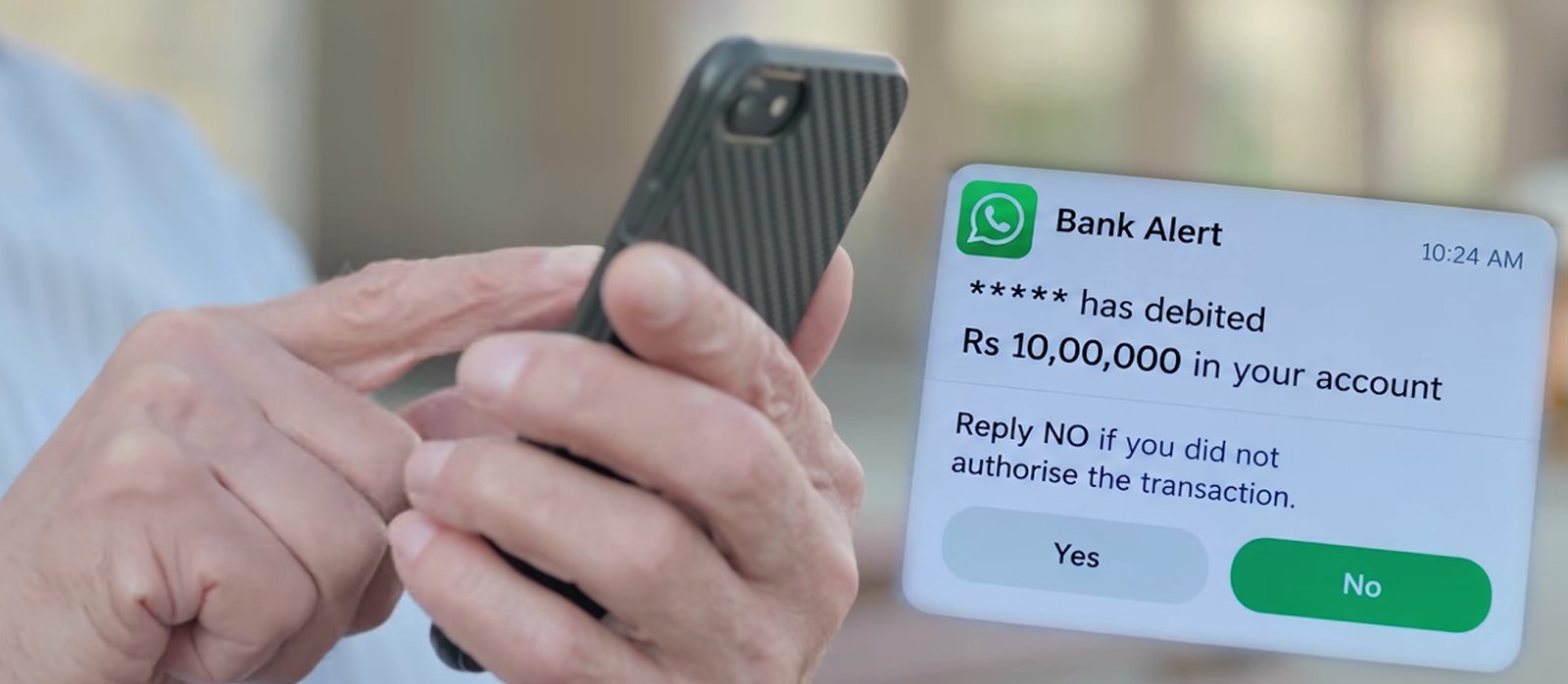

I have spent three decades in technology, and the scams that worry me most need no technical skill at all. The WhatsApp bank alert scam is a good example. A message from an unknown number says a large amount, say Rs 10,00,000, has left your account, and asks you to reply “NO” if you did not make the transaction. Replying is the mistake. This post explains how the scam works, what to do if the message reaches you, and what to do if you have already replied.
The 30 second version
- Do not reply to a WhatsApp message about a debit, whether it says YES, NO or STOP.
- Check your balance only in your bank’s official app or net-banking site.
- Block and report the sender, then ignore any call that follows.
- If money has gone, call the national cyber crime helpline 1930 at once and file a report at cybercrime.gov.in.
Table of Contents
How the “Reply NO” WhatsApp scam works
- A WhatsApp message arrives from an unknown or international number. It claims a large sum, such as Rs 90,000 or Rs 10,00,000, has been debited from your bank account.
- It tells you to reply “NO” if you did not authorise the transaction. Yes and No buttons often make it look like a service your bank runs.
- Your reply tells the sender that your number is active and that someone worried is reading the messages.
- A call or message follows from a “bank official” or a “helpline”. This is where the money is lost: you are pushed to share an OTP, install a remote-access app or tap a link.
What police have said, and what is still unverified
In October 2026, Hyderabad City Police Commissioner V.C. Sajjanar publicly warned about this pattern. He said it needs no OTP and no suspicious link, and that malware activates once the victim replies. One report describes a chartered accountant who lost about Rs 1.70 lakh across two bank accounts after replying “NO”.
Several news reports also note that the exact technical mechanism has not been independently established. A bare “NO” reply on WhatsApp is not, on its own, a proven way to drain an account. My own reading is that it does not matter. The reply marks you as a live and frightened target, and the call, the app or the link that follows is how money actually leaves. Treat the reply itself as the danger and you lose nothing.
Why a fake bank debit alert works so well
Urgency does most of the work. A Rs 10 lakh debit leaves no room to think, and typing one word feels safer than clicking a link, so people lower their guard. WhatsApp also feels personal, which is why parents and senior citizens trust it more than email or SMS. J&K Bank has said publicly that banks do not ask customers to confirm transactions by replying YES or NO on WhatsApp.
The same trick wears other disguises
The wording will change, because scammers rotate the story whenever one version gets famous. The structure stays the same: a message about money, a request to respond, tap or call, and a deadline. Any message that asks you to confirm, cancel, dispute or reverse a payment through a reply or a link should get the same treatment. Related versions I have covered include the old coin buyer scam that steals your KYC and the fake electricity bill APK scam.
What to do if you receive a fake debit alert on WhatsApp
- Do not reply, not even “YES”, “NO” or “STOP”.
- Check your balance and recent transactions in your bank’s official app or net-banking site, never through a link in the message.
- Block and report the number in WhatsApp, then delete the chat.
- Ignore any follow-up call that mentions the alert. If you want to speak to your bank, use the number printed on your debit card or passbook.
- Tell your family, especially anyone who treats every WhatsApp message as genuine.
What to do if you already replied “NO”
In the first 15 minutes
- Do not answer or return calls from anyone claiming to be from your bank. Never share an OTP, PIN or CVV.
- Open your bank app directly and check recent transactions. Call the bank’s official customer-care number and ask it to monitor or temporarily freeze the account.
- If any money has moved, call the national cyber crime helpline 1930 straight away. Reporting early improves the chance of stopping the transfer. If the number has changed by the time you read this, cybercrime.gov.in lists the current one.
In the next few hours
- File a complaint at cybercrime.gov.in.
- Uninstall any app you added after the message, especially screen-sharing or “support” apps.
- Change your banking, UPI and email passwords from a device you trust.
- Scan the phone for threats, or take it to a service centre if you are unsure.
If you think the phone itself is compromised or lost, my guide on what to do if you lose your phone in India covers blocking your SIM, UPI and net banking fast. Setting a SIM PIN is a useful second layer.
Forward this to your family group
Most victims of this scam are people who never read articles like this one. A short message in the family group does more good than a long explanation. Copy this and send it today:
Scam alert. If a WhatsApp message says money was debited from your bank account and asks you to reply NO, do not reply. Do not tap any link or call any number in it. Open your bank’s own app to check your balance. If money is lost, call 1930 immediately.
A family rule helps too: nobody in the house replies to a message about money. We call the bank from the number on the card, and we do it before we answer anything.
Frequently asked questions
Can replying NO on WhatsApp really empty my bank account?
Police say it can, while independent reports say the exact mechanism is unproven. In either case the reply invites follow-up attacks, so do not reply.
Do banks send debit alerts on WhatsApp asking for YES or NO?
Banks have said they do not. Genuine alerts reach you through the bank’s app, its registered SMS sender or other verified channels, and none of them ask you to confirm a debit by replying.
What is the cyber crime helpline number in India?
The national helpline is 1930, and complaints are filed at cybercrime.gov.in. Confirm the current number on the portal if you are reading this years from now.
How do I report a scam number on WhatsApp?
Open the chat, tap the sender’s name, then choose Block and report. Do this after you have taken a screenshot, since the police and your bank may ask for it.
My takeaway
Scammers do not need to break your bank’s security if they can rush you into doing it for them. The scripts will keep changing, but the rule that protects you does not: if a message makes you panic, verify through the bank’s own app or number before you type a single word back. If you want to practise spotting these, the free daily quiz at becybersmart.in takes about three minutes.
Sources
- Free Press Journal: Hyderabad Police warning
- UNI India: Hyderabad Police warning, 12 October 2026
- Kashmir Life: J&K Bank advisory
- Digital Terminal: mechanism not independently verified
Last reviewed: October 2026. Helpline numbers and portal addresses can change, so confirm them on cybercrime.gov.in.


Pingback: What to Do If You Lose Your Phone in India | The Honest Lens